Plan it.
Share it. Run it.
Running orders, setlists, notes and cues — for bands and venues, theatres, conferences and every event that runs to a plan. On laptop, iPad and phone, even offline.
Works offlineInstalls as an appData hosted in Germany
by accident.Two-sided toggles · Composed Live
Nothing flips by accident.
A toggle knows its way back: “Vox gain +5 dB” now, “back −5 dB” when the song is over; “In-ear Robert: Gtr −3 dB” for the ballad, back up after. It blinks when it's due, asks before it flips, and chains across songs in a row — so what you changed in song 2 is undone in song 4, not forgotten.
Everyone sees what they need.
Share a setlist with your crew, the house lighting tech or the band — each sees exactly what's meant for them, down to single notes and fields. The lighting tech gets the light cues, not your mix notes. The promoter only needs the running order? Send a public link: no account, always up to date.
what they need.Groups & public links · Composed Live
Built for the show.
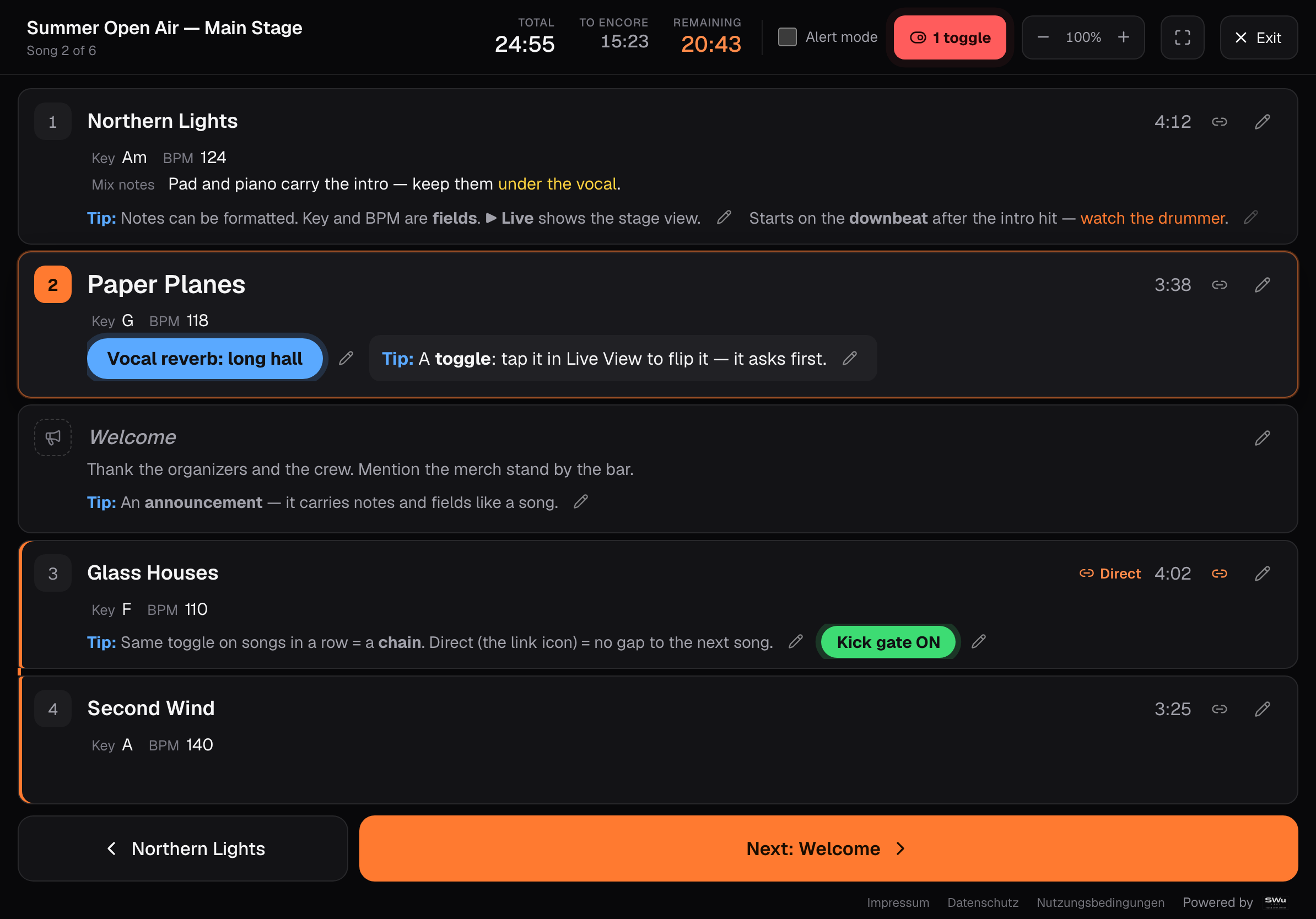
Live View
Big, calm rows; the current entry opens up with its notes in full. Next names what comes next.
Timing at a glance
Total, remaining, and the time to the next break or encore — for the whole show and from any song.
Notes, badges, fields
Formatted notes, colored badges and your own fields — key, BPM, speaker, cue, mic.
Works offline
Everything lives on your device first. No signal at the venue? Nothing changes. It syncs when you're back.
On every screen
Laptop, iPad, phone — installs as an app with its own icon, full screen, light or dark.
Your data, in Germany
Hosted in Germany, GDPR by design. No ads, no tracking of what you write.
For everything that runs to a plan.
Not just stages: anything with a schedule, people to brief and things to tick off. Pick yours — the app opens with a ready-made example.
Bands
Setlists, song library, cues for the desk and in-ears.
Open the example →Venues
Event nights from load-in to curfew, briefed to the house crew.
Open the example →Theatre
Scenes with light and sound cues, the interval, the curtain call.
Open the example →Conferences & science
Sessions and speakers, pick-ups from the hotel, catering — ticked off as they happen.
Open the example →Churches
Songs with keys, readings, the sermon — for the team and the tech booth.
Open the example →Anything with a plan
Weddings, galas, award shows, sports events, broadcast rundowns.
Start from scratch →Compose your event.
- 1
Add your band, venue or team
No account needed to start — everything is saved on your device.
- 2
Build the plan
Songs or program items, breaks, notes, toggles and fields.
- 3
Go live
One tap for the view you use during the show. Share it with your crew when you like.
Free while we're in beta.
Every feature, no limits, until 31 December 2026. Tell us what's missing with the feedback button in the app — beta testers shape what Composed becomes.
Questions.
Do I need an account?
Not to start: everything works on your device. An account adds sync between devices and sharing with others.
Does it work without internet?
Yes. The app and your data are on the device; changes sync once you're online again.
Where is my data?
On your device, and — if you sign in — on our servers in Germany. GDPR, no ads, no tracking.
What does it cost?
Nothing during the beta, until 31 December 2026. Licenses come after that.